Driveshafts, halfshafts & prop shaft (AWD)
The spinning driveline — the parts nobody usually animates. One role, Driveline, covers all of it:
- a halfshaft (diff → hub) that aims at the wheel, plunges as it travels, and spins;
- a centre prop shaft (down the tunnel) that just spins in place.
For AWD, you add one shaft per driven output — a rear prop shaft and a front one, plus front halfshafts — each reading its own driven wheel. It’s a visual layer: it spins off a real wheel’s roll but adds no physics.
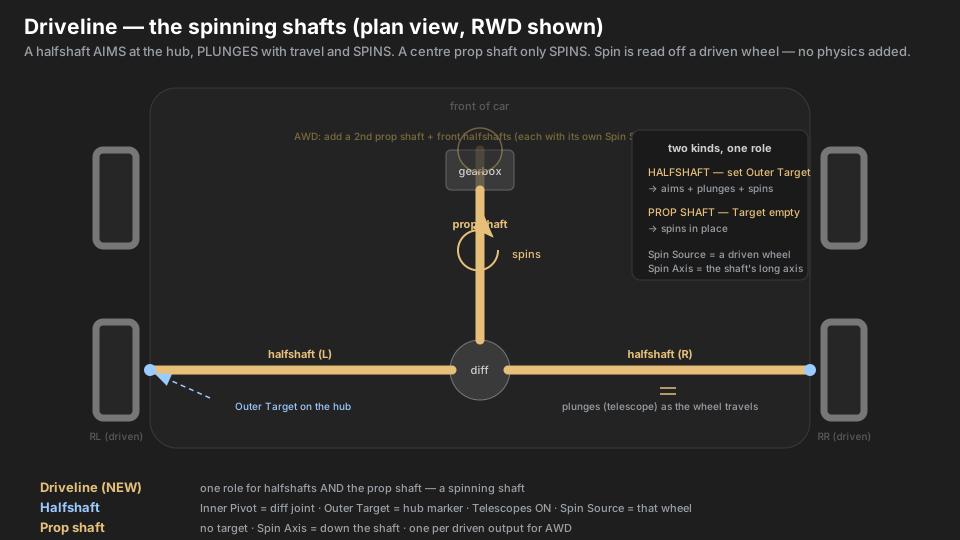
Parts → roles
| Real part | Marker | Role | Settings |
|---|---|---|---|
| axle shaft / halfshaft (each side) | RL_Halfshaft / RR_Halfshaft |
Driveline | Inner Pivot = RL_DiffJoint · Outer Target = RL_ShaftEnd (on the hub) · Telescopes ON · Spin Source = RL · Spin Axis = down the shaft |
| where the shaft meets the hub | RL_ShaftEnd |
(no component) | a marker parented under that side’s Hub |
| the diff-side joint (fixed) | RL_DiffJoint |
(no component) | a marker on the chassis / diff |
| centre prop shaft | PropShaft |
Driveline | Outer Target = empty · Spin Source = RL (a driven wheel) · Spin Axis = down the shaft |
| front prop shaft (AWD only) | PropShaftFront |
Driveline | Outer Target = empty · Spin Source = FL · Spin Axis = down the shaft |
Hierarchy
Rear
├── PropShaft            Driveline  (no target — spins · Source = RL)
├── RL
│   ├── RL_Hub               Hub · SteerCamber
│   │   └── RL_ShaftEnd      (no component — the shaft's hub end)
│   ├── RL_DiffJoint         (no component — fixed inner joint)
│   └── RL_Halfshaft         Driveline  (Pivot = RL_DiffJoint → Target = RL_ShaftEnd · Source = RL)
└── RR                       ... mirror of RL
A prop shaft has no hub to aim at, so “Build Rig Hierarchy” parks it on Front/Rear (like an axle). A halfshaft aims at a hub, so it lives in its corner like an arm.
What makes it different
- One role, two behaviours. Set an Outer Target and it’s a halfshaft: it aims at the hub and telescopes to stay attached (CV plunge), and spins. Leave the target empty and it’s a prop shaft: it keeps its pose and only spins.
- Spin comes off a real wheel. Pick a Spin Source — a driven wheel (RL/RR on a RWD car). The shaft turns as fast as that wheel rolls. Spin Scale is a purely visual multiplier.
- Spin Axis is the shaft’s own long axis. In local space, which way does the mesh point? Usually
+Z(0,0,1) or+X. Get this wrong and it wobbles instead of spinning cleanly. - AWD is just more shafts. There’s nothing special to switch on — add a second prop shaft and a front halfshaft pair, each pointing at its own front Spin Source.
Setup, step by step
- Add an empty under each hub where the shaft plugs in:
RL_ShaftEnd,RR_ShaftEnd. - Add an empty at each diff-side joint (
RL_DiffJoint, …) — on the chassis, it doesn’t move much. - Put a KSuspBone on each halfshaft mesh, Role = Driveline. Inner Pivot = the diff joint, Outer Target = the hub-side marker, Telescopes ON, Spin Source = that side’s wheel.
- Set Spin Axis to the shaft’s local long axis (aim it down the shaft — e.g.
0,0,1). - For the prop shaft: KSuspBone on the mesh, Role = Driveline, leave Outer Target empty, pick a driven Spin Source, set Spin Axis down the shaft.
- (AWD) repeat step 5 for the front prop shaft and add front halfshafts with FL/FR sources.
- Build Rig Hierarchy → Bake .ksusp. The report should list
… and N driveline(s).
Type gotchas
- Spin looks frozen? The spin is read from the game’s wheel-mount transform. If a particular car spins its wheel on a child mesh instead, the mount doesn’t rotate and the shaft won’t either — that’s a known limitation (a car-speed fallback is on the list). Everything else (aim, plunge) still works.
- Wobbling instead of spinning = wrong Spin Axis. It must be the shaft’s local long axis, not a world direction. Rotate the view to the shaft and check which local axis runs down it.
- Use a driven wheel as the source. A front prop shaft on a RWD car reading a front wheel will still spin (wheels roll from rolling), but for the right look tie each shaft to the wheels it feeds.
- The prop shaft shouldn’t aim. If you accidentally set an Outer Target on it, it’ll try to point at that and pivot — leave it empty so it only spins.
- No physics. This never drives the car, adds grip, or changes anything the wheels do — it’s paint.