Build your own suspension for CarX
Advanced Suspension Maker (ASM) turns a suspension model into a rig that moves for real in CarX Drift Racing Online — arms swing, struts telescope, springs squash, solid axles roll.
You don’t animate anything. You mark up the model, pick a Role for each marker, and bake one small file. The mod drives it from the car’s actual wheel movement: travel, steer, camber, roll.
Start here
| 🚀 Getting Started | The full walkthrough: mark up a corner, build, bake, install. |
| 🧭 Tutorials | One step-by-step guide per suspension type, each with a diagram. |
| 🔧 Full walkthrough | The long-form version, start to finish. |
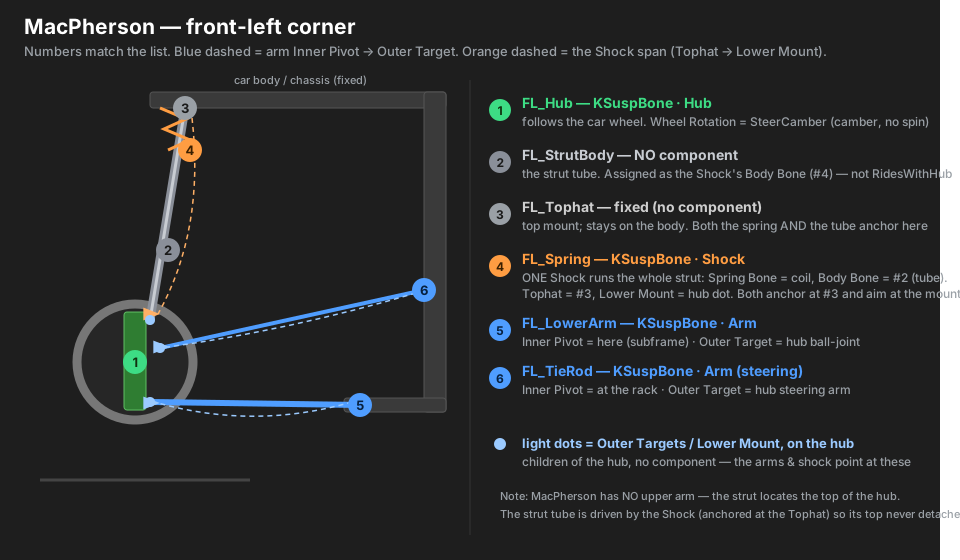
| 📐 FL corner reference | Every marker of one corner, spelled out. |
Pick your suspension type
| Type | Use it for | Guide |
|---|---|---|
| MacPherson strut | most front ends (GT86, E36 front) | 01-macpherson |
| Double wishbone | sports/race front or rear | 02-double-wishbone |
| Multilink | modern rear (3–5 links) | 03-multilink |
| Trailing arm | BMW E36/E30 rear, older rears | 04-trailing-arm |
| Cantilever / pushrod | inboard shock, race cars | 05-cantilever-pushrod |
| Solid / live axle | beam axles, swaps, trucks | 06-solid-axle |
How it works
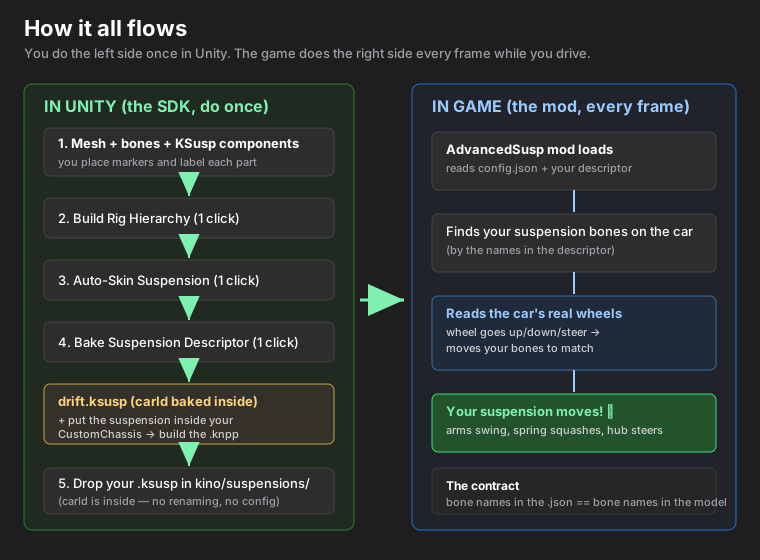
You place markers, the SDK organises them, the mod animates them.
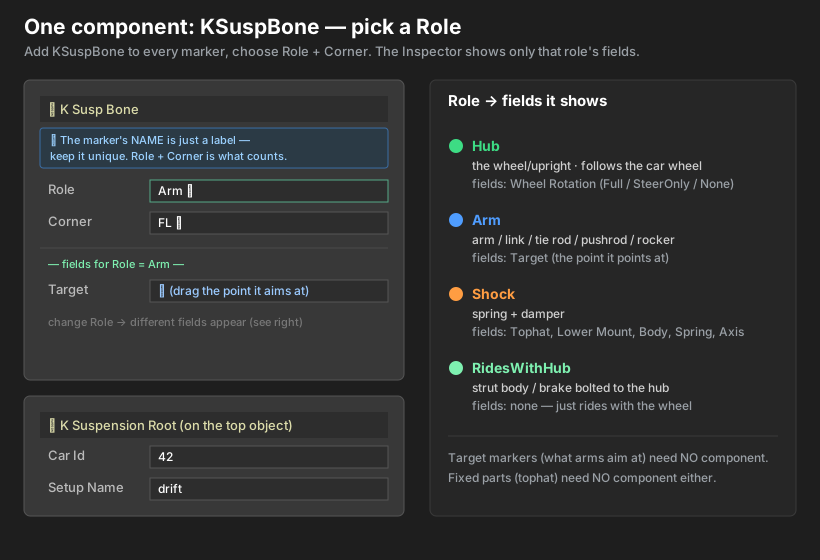
The roles
One KSuspBone component per marker — pick a Role and a Corner, and the Inspector shows only
the fields that role needs.
| Role | Goes on | What it does |
|---|---|---|
| Hub | the upright / knuckle | follows the game wheel: travel, steer, camber |
| Arm | any link, arm or rod | rotates about its inner pivot toward a hub target, stretching to stay attached |
| Shock | spring + damper | pins at the tophat, locks its bottom to the lower mount, twists with the hub |
| RidesWithHub | brake, caliper, rotor | rigidly bolted to the hub |
| Axle | a solid/live axle beam | spans both wheels — rides their midpoint and tilts between them |
| Driveline | a driveshaft / prop shaft | spins off a driven wheel; a halfshaft also aims + plunges at the hub (AWD-ready) |
| SwayBar | an anti-roll bar | spans both wheels — twists with the left↔right travel difference |
| Rack | the steering rack | slides sideways with the average front steer; inner tie-rods ride it |
New: Driveline, SwayBar and Rack add the spinning driveline, anti-roll bar and steering rack — see the tutorials. And the bone visualiser draws every link as a coloured line in Unity and in game (F8).
The five-minute version
- Mark up the model — an empty at each pivot, ball joint and mount.
- Add
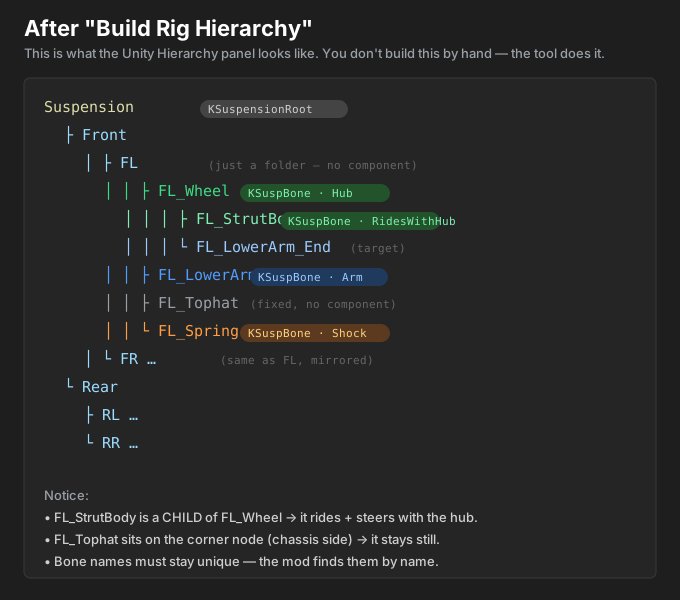
KSuspBoneto each → set Role + Corner. - Tools ▸ KSL ▸ Build Rig Hierarchy — sorts it into
Root → Front/Rear → FL/FR/RL/RR. - Tools ▸ KSL ▸ Attach Parts to Bones — binds your meshes.
- Set Car Id + Setup Name on
KSuspensionRoot. - Tools ▸ KSL ▸ Bake Suspension Descriptor → save the
.ksusp. - Drop it in
…\CarX Drift Racing Online\kino\suspensions\and fully restart the game.
Two rules that fix 90% of problems
- Hub-side targets (
*_end, a shock’s Lower Mount) must be children of the Hub — that’s what makes them ride and steer with the wheel. - Put a shock’s Lower Mount on the kingpin/strut axis, so steering twists the strut about it instead of swinging the whole thing sideways.
Requirements
- Unity (any version that opens your car project)
- KSL / Kino — the mod loader CarX mods run on
- The AdvancedSusp mod — runs your
.ksuspin game
MIT licensed. This project ships only original code and documentation — no game assets, no decompiled code, no third-party binaries.