Anti-roll bar (sway bar)
The bar that twists as the left and right wheels travel differently. Both wheels up together (pure heave)? No twist. One wheel up, the other down (pure roll)? Maximum twist. Like the solid axle, this reads two corners at once, so it gets its own cross-corner role: SwayBar.
Great on a drift car leaning on the door handles, or any build where you’ve modelled the bar.
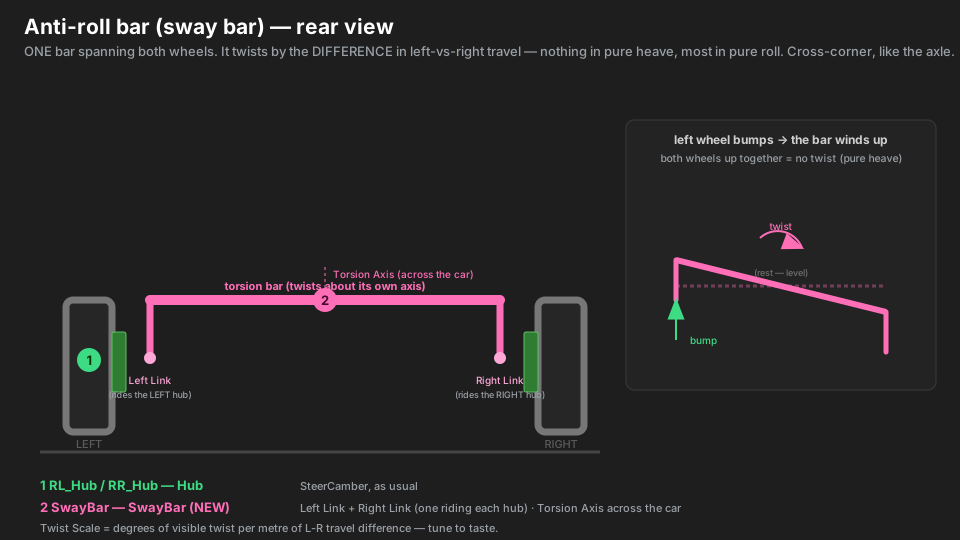
Parts → roles
| Real part | Marker | Role | Settings |
|---|---|---|---|
| upright / hub (each side) | RL_Hub / RR_Hub |
Hub | Wheel Rotation = SteerCamber |
| the bar (torsion section + blades) | RearSwayBar |
SwayBar | Left Link = RL_SwayLink · Right Link = RR_SwayLink · Torsion Axis = across the car |
| drop-link point (each side) | RL_SwayLink / RR_SwayLink |
(no component) | a marker parented under that side’s Hub (or lower arm) |
Hierarchy
Rear
├── RearSwayBar          SwayBar · Left = RL_SwayLink · Right = RR_SwayLink
├── RL
│   ├── RL_Hub               Hub · SteerCamber
│   │   └── RL_SwayLink      (no component — the LEFT drop-link point)
│   └── ...
└── RR                       ... mirror (RR_SwayLink under RR_Hub)
Like the axle, the bar sits on Rear (or Front), not inside a corner — it belongs to neither. “Build Rig Hierarchy” parks it there for you.
What makes it different
- It reacts to a difference, not a position. The bar twists by
Twist Scale × (left travel − right travel). Move both wheels the same and the difference is zero — no twist. That’s exactly a real anti-roll bar, and it’s why the two links must ride opposite wheels. - The links do the sensing.
RL_SwayLink/RR_SwayLinkare plain markers under each hub, so they inherit each wheel’s travel. The bar just reads how far apart they’ve moved vertically. - Torsion Axis is the bar’s centreline. In local space, which way does the bar run across the car?
The twist happens about that axis. Usually
1,0,0. - Twist Scale is taste. It converts metres of travel-difference into degrees of visible twist.
Start around
30and dial it until the motion reads right — it’s cosmetic, so tune by eye.
Setup, step by step
- Put a Hub on each side as usual (SteerCamber).
- Add an empty under each hub (or its lower arm) at the drop-link:
RL_SwayLink,RR_SwayLink. No component — just markers. - Put a KSuspBone on the bar mesh, Role = SwayBar. Drag the two links into Left Link and Right Link.
- Set Torsion Axis to the bar’s local across-the-car axis (e.g.
1,0,0). - Leave Twist Scale at the default for now — you’ll tune it once it’s in game.
- Build Rig Hierarchy → Bake .ksusp. The report should say
… and 1 sway bar(s).
Type gotchas
- Left and Right must be opposite wheels. Two links on the same side (or the same marker twice) give no difference to react to — the baker warns and skips it.
- Links must be UNDER the hubs. A link left on the chassis never moves, so the bar reads a constant zero difference and never twists.
- Only the twist is animated. The bar spins about its torsion axis; it doesn’t bend its blades independently. For most bar meshes that reads correctly. If your blades are separate meshes you want articulated, rig those as Arms pointing at the link markers.
- Too much / too little motion = Twist Scale. It’s the one knob — raise it for more drama, lower it if the bar visibly over-rotates.
- No physics. It won’t actually resist roll or change handling — it’s a visual bar.