Steering rack translation
The rack slides sideways as you steer, and the inner tie-rod ends ride it — so the tie rods pivot from a moving inner point instead of a fixed one. It’s the small detail that makes a steering rig look real. The role is Rack, and it lives at the front.
This animates the rack body + inner pivots. Your knuckles/steering rods still do the actual steering; this just makes the rack track it.
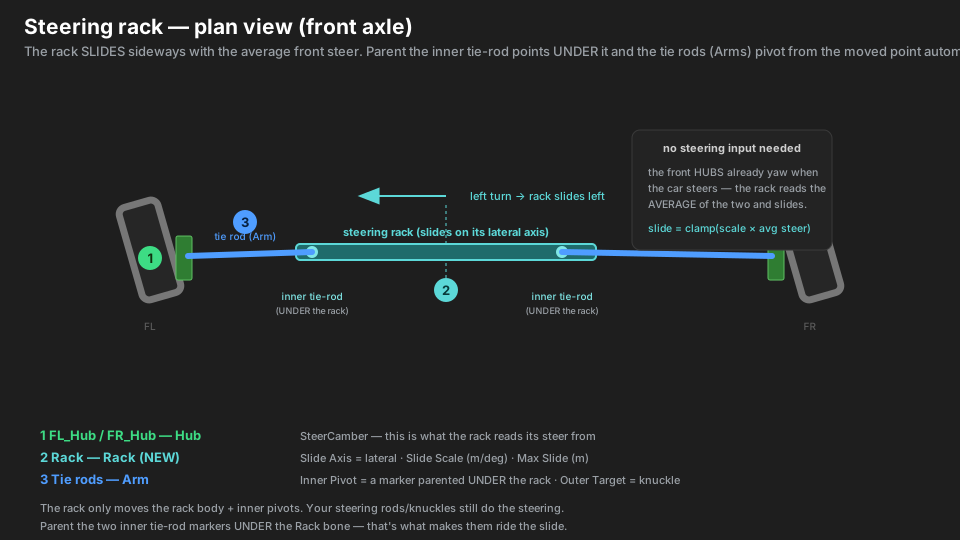
Parts → roles
| Real part | Marker | Role | Settings |
|---|---|---|---|
| front upright / knuckle (each side) | FL_Hub / FR_Hub |
Hub | Wheel Rotation = SteerCamber |
| the rack bar | SteeringRack |
Rack | Slide Axis = lateral (across the car) · Slide Scale (m/deg) · Max Slide (m) |
| inner tie-rod point (each side) | FL_TieInner / FR_TieInner |
(no component) | a marker parented UNDER the Rack |
| tie rod (each side) | FL_TieRod / FR_TieRod |
Arm | Inner Pivot = FL_TieInner (on the rack) · Outer Target = FL_Knuckle (on the hub) · Telescopes ON |
Hierarchy
Front
├── SteeringRack         Rack · Slide Axis = lateral
│   ├── FL_TieInner          (no component — inner tie-rod point, ON the rack)
│   └── FR_TieInner          (no component)
├── FL
│   ├── FL_Hub               Hub · SteerCamber
│   │   └── FL_Knuckle       (no component — the tie rod's outer target)
│   └── FL_TieRod            Arm  (Pivot = FL_TieInner → Target = FL_Knuckle)
└── FR                       ... mirror of FL
The two inner tie-rod markers are children of the Rack — that’s the whole trick. When the rack slides, they slide with it, and the tie-rod Arms (which pivot about them) follow automatically.
What makes it different
- No steering input required. We never get a steering angle from the game — but the front hubs already yaw when the car steers. The rack reads the average of the two front hubs’ steer and slides from that.
- The slide feeds the tie rods for free. Because the inner pivots are parented to the rack, the existing tie-rod aim starts from the moved point — you don’t touch the tie rods at all.
- Slide Scale + Max Slide shape the motion. Slide is
clamp(Slide Scale × average steer, ±Max
Slide)
. Scale sets how much rack travel per degree of steer; Max Slide stops full lock from over-travelling the rack off its housing. - Slide Axis is the rack’s lateral axis. In local space, which way does the rack run across the
car? Usually
1,0,0.
Setup, step by step
- Put a Hub on each front side (SteerCamber) — the rack reads its steer from these.
- Put a KSuspBone on the rack mesh, Role = Rack. Set Slide Axis to its local lateral axis.
- Add an empty at each inner tie-rod joint (
FL_TieInner,FR_TieInner) and parent them under the Rack bone. No component on these. - Add an empty on each hub for the tie rod’s outer end (
FL_Knuckle, …). - Rig each tie rod as an Arm: Inner Pivot = its
*_TieInner(on the rack), Outer Target = the knuckle (on the hub), Telescopes ON. - Build Rig Hierarchy → Bake .ksusp. The report should say
… and 1 rack(s). - In game, tune Slide Scale (and Max Slide) until the rack travel matches the steering.
Type gotchas
- The inner pivots MUST be parented under the Rack. This is the one non-optional step — if they’re under the hub or the chassis instead, the rack slides but the tie rods don’t move with it.
- Rack goes on Front. Its Corner field only picks Front vs Rear; “Build Rig Hierarchy” parks it on the front group.
- Wrong Slide Axis = it moves the wrong way (fore/aft or up/down). It must be the rack’s local lateral axis, not a world direction.
- Nothing happens usually means Slide Scale is tiny — it’s metres per degree, so
0.01is a sensible start; go up if the rack barely moves. - This isn’t the steering itself. The wheels steer because of your knuckle/steering-rod setup — the Rack only makes the rack body and inner tie-rod points track that steer.